| ORANGE | WHITE | PURPLE | OFF |
| Drink Size Button: Indicates the Water Tank status | 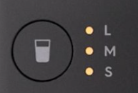 - Static light: Water Tank is missing
- Blinking light: Not enough water in the Water Tank when the machine starts the drink making process.
| 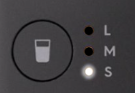 - Static light (selected size): Water Tank is installed correctly.
| NA | |
| Carbonation Level Button: Indicates the CO2 Cylinder | - Flashing light when pressed: CO2 Cylinder is missing (still possible to make a non-carbonated drink)
- CO2 Cylinder is installed:
- Static light (selected level): Reset has not been done / Low CO2 level
- Blinking light (all 3 LEDs): Reset is complete; the CO2 level is low – be ready with a new and full CO2 Cylinder on hand!
| - Static light: CO2 Cylinder has been installed correctly: Reset is complete
| NA | |
| Flavor Indicator: Displays the Flavor Bottle status | | | | |
| Status Light Ring: Indicates the Activation Button | - Blinking light –System purge required (drain remaining water).
- Static light – Error / Malfunction
| - Light turns on and then turns off – Power adapter is connected to the power outlet correctly
- Lights are circling – Drink is in process
- Static light – Ready for activation; select a flavor level from 0 to 4 using the Flavor Dial
- Blinking light – Water Tank is Out of water
- Light blinks 3 times and the remains static – Drink is ready
| - Static light – Flavor Dial is set to ‘B’
- Lights are circling – Boost flavor level is in process
| - Off - Machine is off / sleep
|